


Our latest product features - July, 2026
Get a glimpse of how we are innovating in our product development and shaping the future of data-driven trading.
See Full List
322
Product Improvements
120
Bugs Squashed
Feature Highlights
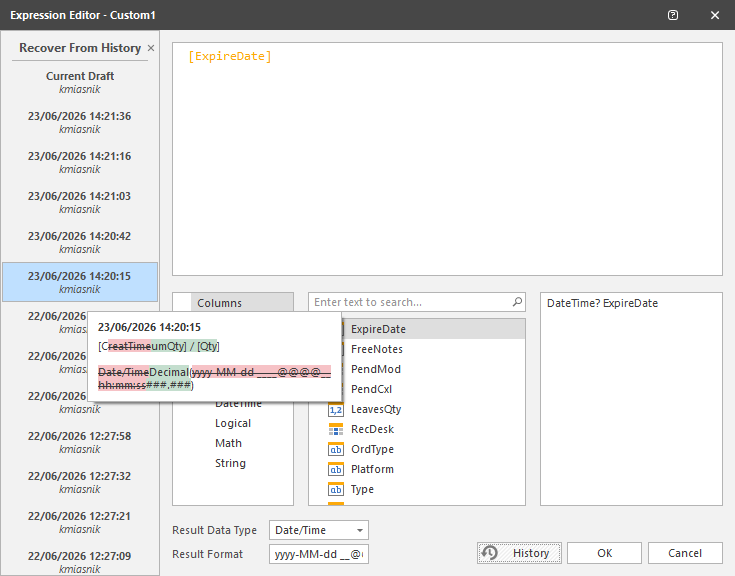
View Custom Column Change History In Editor
Extending the existing report of the history of changes to trading front end custom column expressions, this history is now displayed in the graphical expression editor for custom column expressions. The user can view the history of changes to the existing expression in the editor, a diff tooltip to indicate the exact changes made between versions, and also recover previous expression values from the history into the current expression value editor.
Multiple Block and Allocation Import
Allows middle-office personnel and execution traders to process bulk order allocations simultaneously via a single file upload. Users can drag and drop standard CSV or Excel templates containing multiple distinct block trades and their corresponding allocation accounts directly into the system interface. The system automatically parses, validates, and matches the allocations against the block orders in real time, alerting users to any discrepancies or validation errors before final processing. This capability removes the manual friction of entering allocations line by line, drastically reducing operational risk and post-trade processing times during peak volume periods. It fully supports equities, fixed income, and derivatives, offering full configurability to accommodate custom institutional allocation workflows.
Multiple Front End Authentication
Users can now log into more than one Quod interface at the same time using a single account, rather than needing separate logins for trading and administration. The platform tracks sessions per interface, based on where the connection originates and which application is being used, so the same user can be active in both the .NET Trading front end and the Web Admin front end simultaneously. To preserve existing security controls, a user is still restricted to a single active session within any one interface. This removes the operational overhead of maintaining duplicate user accounts purely to allow parallel access across trading and administrative tools, while keeping each user's existing permission and institutional-assignment structure unchanged.
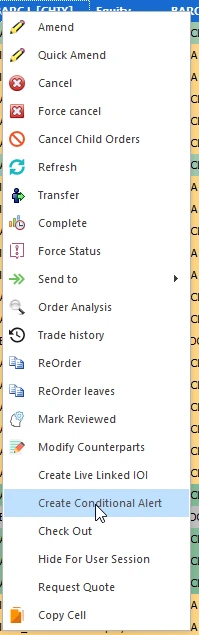
Conditional Alerts Configured From Live Orders
Traders can now create a Conditional Alert directly from one or more selected orders in the Order Book or Child Order Book, without opening the standalone alert-creation screen. A new right-click option, or an optional toolbar quick-action button, generates the alert automatically in the background, pre-named from the client, side, instrument, and quantity of the originating order and linked to that order's ID. The alert triggers once the order reaches 100% execution, giving traders an immediate, hands-free way to know when a working order is filled. Removing the extra manual data entry previously required speeds up a common workflow for desks that rely on alerts to track execution progress across a busy blotter.
FX Market Making Pricing Adjustment Based On Schedule
FX market makers can now automatically adjust client pricing margins on a configured time schedule, rather than changing them manually for recurring conditions such as night hours, weekends, or known event windows. The feature reuses the existing Schedules entity, the same mechanism already used to drive the Auto Hedger, so a defined bid and ask margin is applied automatically whenever the linked schedule is active, and removed once it ends. These schedule-based margins sit alongside the existing base and position-based margining, applied in a fixed, predictable order so pricing stays consistent and auditable. This gives sales and pricing teams a configurable way to adapt spreads to different trading conditions throughout the day and week without manual intervention.
Get a glimpse on how we are innovating in our product development
As a consolidated entry point to the answers you need, HUB gives you access to information on our product features, new feature updates, system architecture, user guides, and more - all in one place.
Join Quod Hub