


Qanvas in practice: a depth panel rebuilt from a four-sentence request
Experience Qanvas
Qanvas is Quod Financial's AI-native trading workstation: a customisable front end and workflow layer on Quod's multi-asset OMS, EMS and smart order router, where a new desk workflow is specified in plain language and can often reach production in hours rather than months.
A trader asked for a revised montage.Four sentences later, the depth panel had one.
No ticket. No spec. No product manager translating a trader’s request into a backlog item: just a sentence, in the plain language your own desk already speaks. What follows is exactly what happened next: the panel as it was, the conversation that shaped it, and the panel it became.
- Surface
- Depth of Market panel
- Instrument
- TD.CA · TSX / NYSE
- Asked for by
- Equity desk
- Written by
- Qanvas, in one session
Before
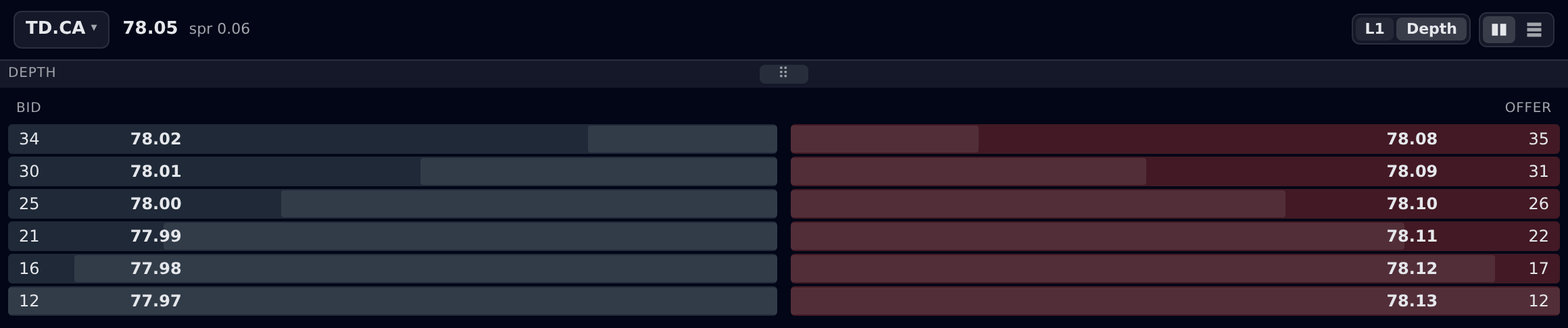
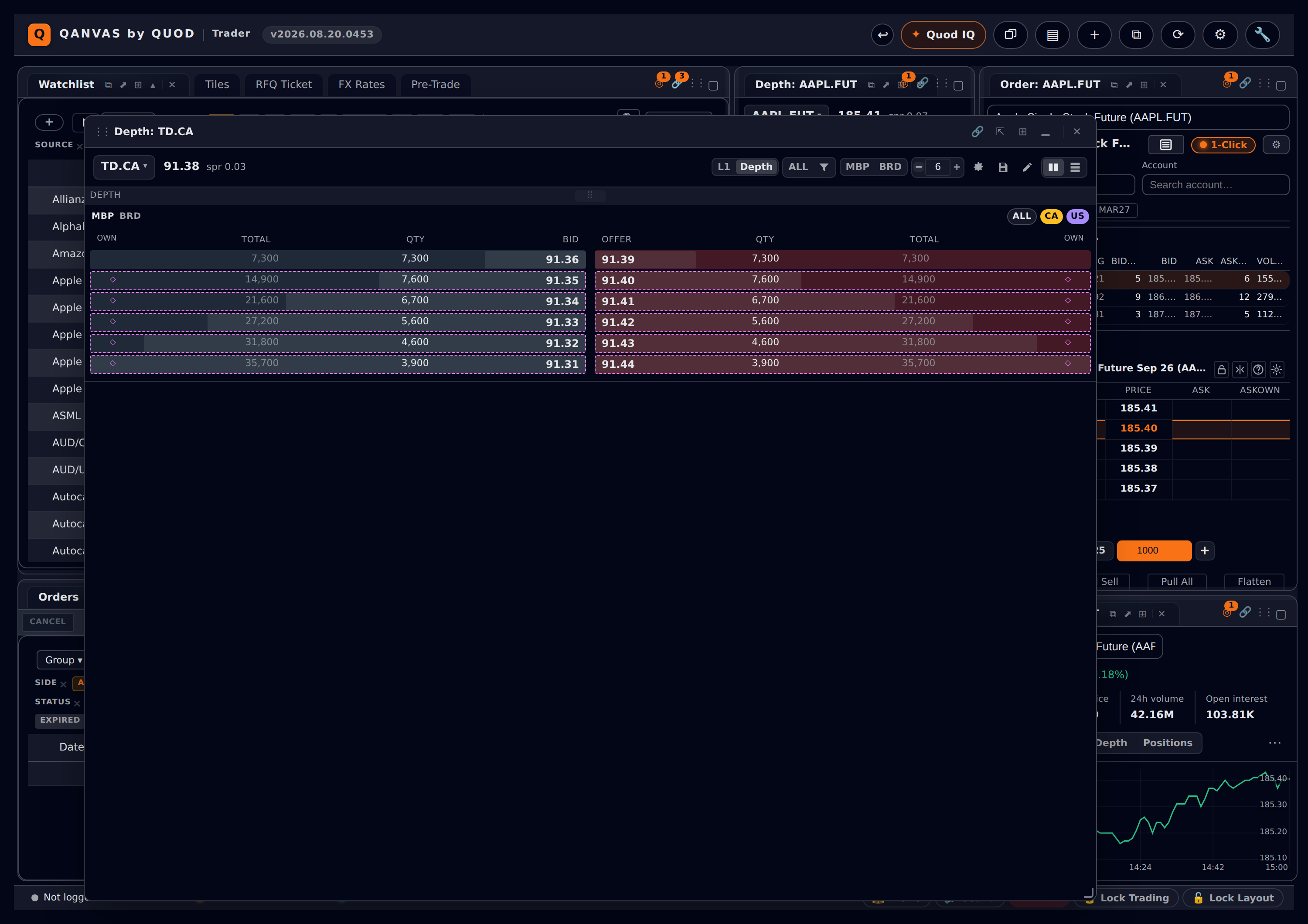
One book, no attributionPicture your own depth panel doing this: one line per price, the total resting there, nothing else. Usually this is everything a trader needs, but for an interlisted name it hides everything your desk actually trades on: which market the liquidity sits on, which broker put it there, and whether one line is one order or nine.
The conversation
Plain request → pinned scopeNobody wrote a specification. The desk said what it wanted in the words a trader actually uses, and Qanvas asked back only the questions that would change the build. The answers became the spec. Here’s how it actually went, trimmed only for length.
Our depth window isn't much use on interlisted names. On TD I get one list of prices and sizes. The desk needs to see who is behind the orders and which market they're resting on. Can you make it work like a montage?
I can. Like a montage
covers three different splits of the same book, so let me pin down which ones you actually want on screen. Two questions:
- When a price level is split, what should one line be: a market, a broker, or a single resting order?
- What identifies the broker on your feed? I need the field, not the firm name.
All three, switchable in one click.
Market by price is a single line with the total order at that price. Market by broker is all the orders per broker at each price level. Market by order is each individual order at each level. So at 10.02 broker 001 has two lines, one order for 500 shares and one for 1,000, both on the bid. On the offer there may be three orders at 10.04.
The broker number is the broker who sent the order: the Participating Organization code.
Clear. Two things that change the design before I build it:
- Books. Toronto runs board lot, odd lot, special terms and the firm book as separate books. Do you want to switch between them, or see them folded together?
- Attribution I cannot invent. If a venue publishes a consolidated level, no amount of client-side logic decomposes it back into brokers and orders. On an instrument whose feed carries no attribution, would you rather the buttons disappear, or stay on screen locked with the reason?
Switch between them: board lot, odd lot, special terms and firm. The firm book displays orders posted by the firm, potentially entered outside Quod.
Locked and visible, please. The desk needs to know it's the feed and not the screen.
One more thing while you're in there: interlisted L1. An order for TD.CA should show the CA bid, offer, last, close and VWAP. And the US ones too.
There's a layout choice on that one. The traditional-style montage tucks the US last, volume, open, high, bid and ask directly underneath the CA equivalents as one block. Keeping each listing on its own labelled row costs a line of height, but both symbols stay readable when you're switching names quickly. Which do you want?
I like seeing both symbols; keep them separate. And being able to switch quickly between the CA and US books, or an aggregated CA/US book, would be powerful.
Then this is what I'll build, and it stays one ladder throughout; never one ladder per market:
- One button cycling MBP DBM MBB MBO, so a line is a price, a market, a broker or an order.
- A second cycling BRD ODD SPC FRM.
- Market chips ALL CA US, where the two single markets add up to the cross-border book.
- An interlisted L1 block with a row per listing, each in its own currency.
Out of scope unless you say otherwise: routing anything off the split. These are display modes, not a cross-border SOR.
That's it. Go.
Two questions, not twenty. Qanvas asks what actually changes the build. Nothing it could ask just to look thorough.
Design rule: clarify what changes the design, nothing else
After
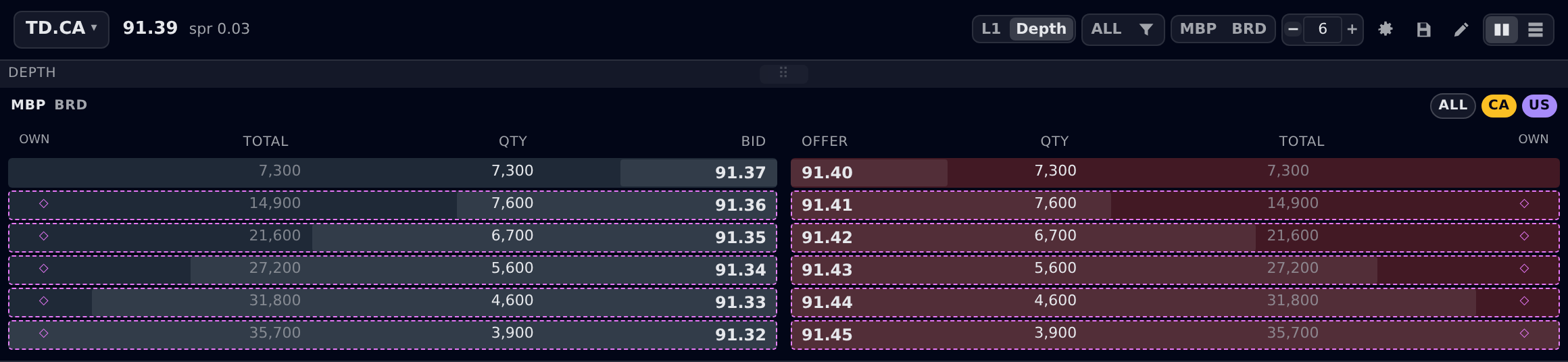
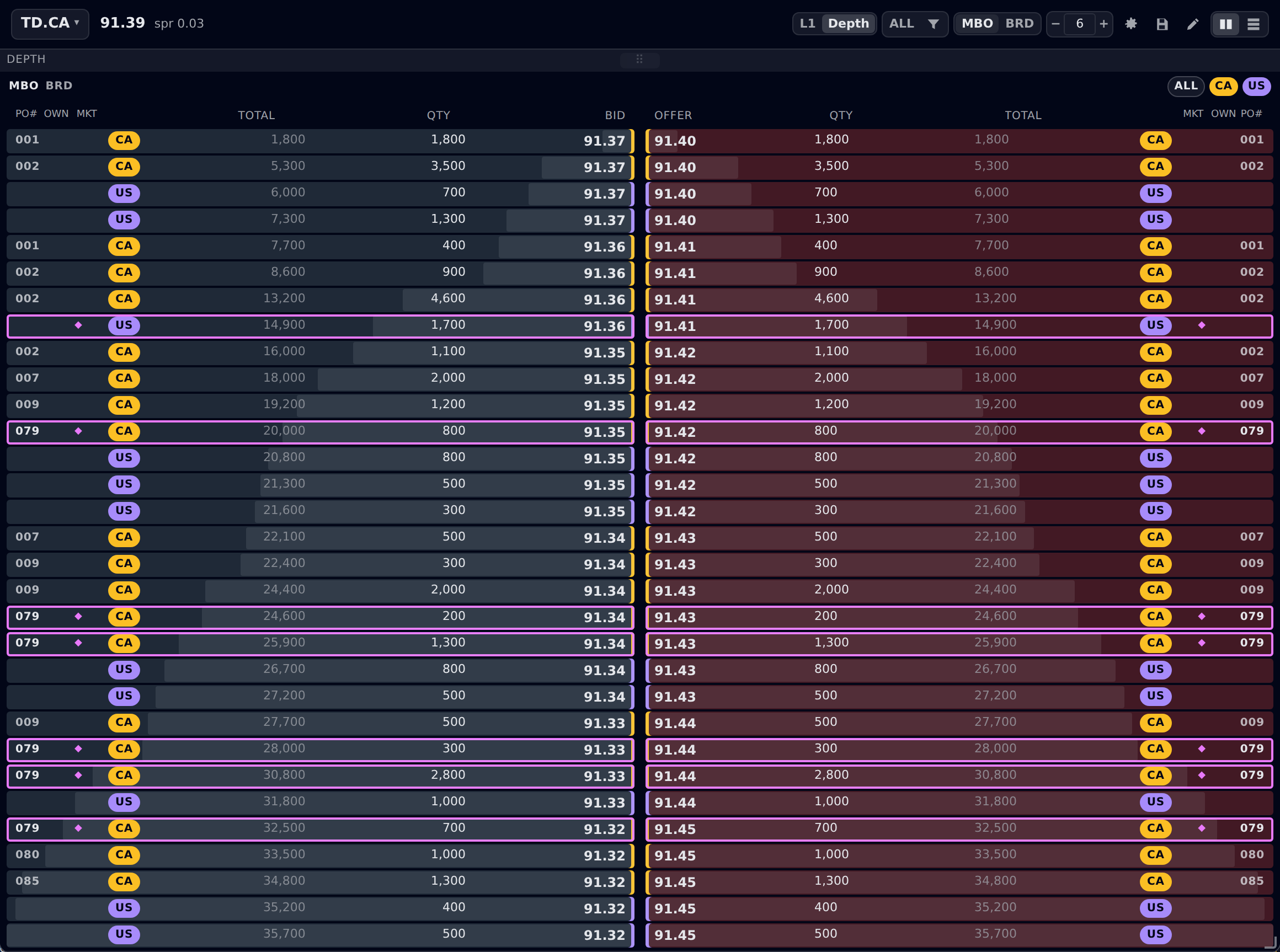
Same panel, same instrument, four questionsThe four views are one book read at four depths. Every order size sums into its broker's line, every broker into its market, every market into the price total. So you can move between them without re-reading the screen, and the numbers never disagree.
Market by price
One line per price carrying everything resting there: the consolidated view the panel always had, now with the market and own-order columns available beside it.
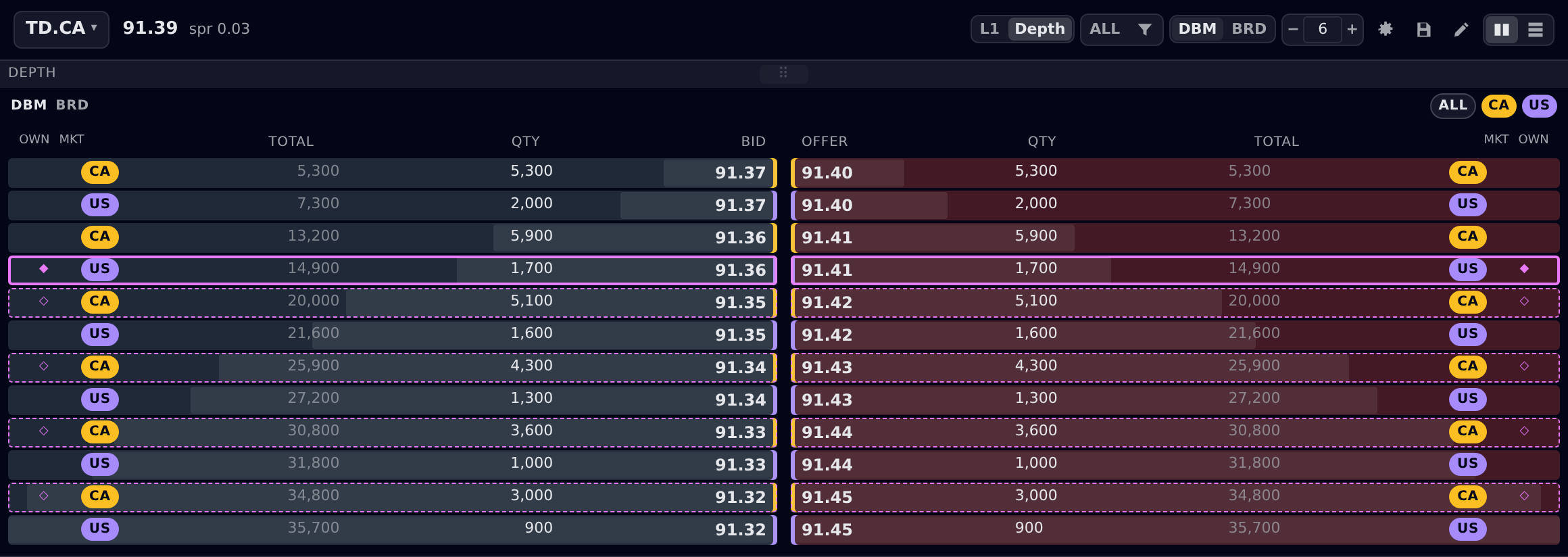
Depth by market
Each price splits into the markets holding it. Venues fold into markets, not the other way round: TSX, TSX Alpha, Nasdaq CXC and Cboe Canada all read CA; NYSE, Nasdaq, Arca, BATS, IEX and EDGX all read US. Two-letter codes only: a montage cell cannot afford the words United States
beside a price.
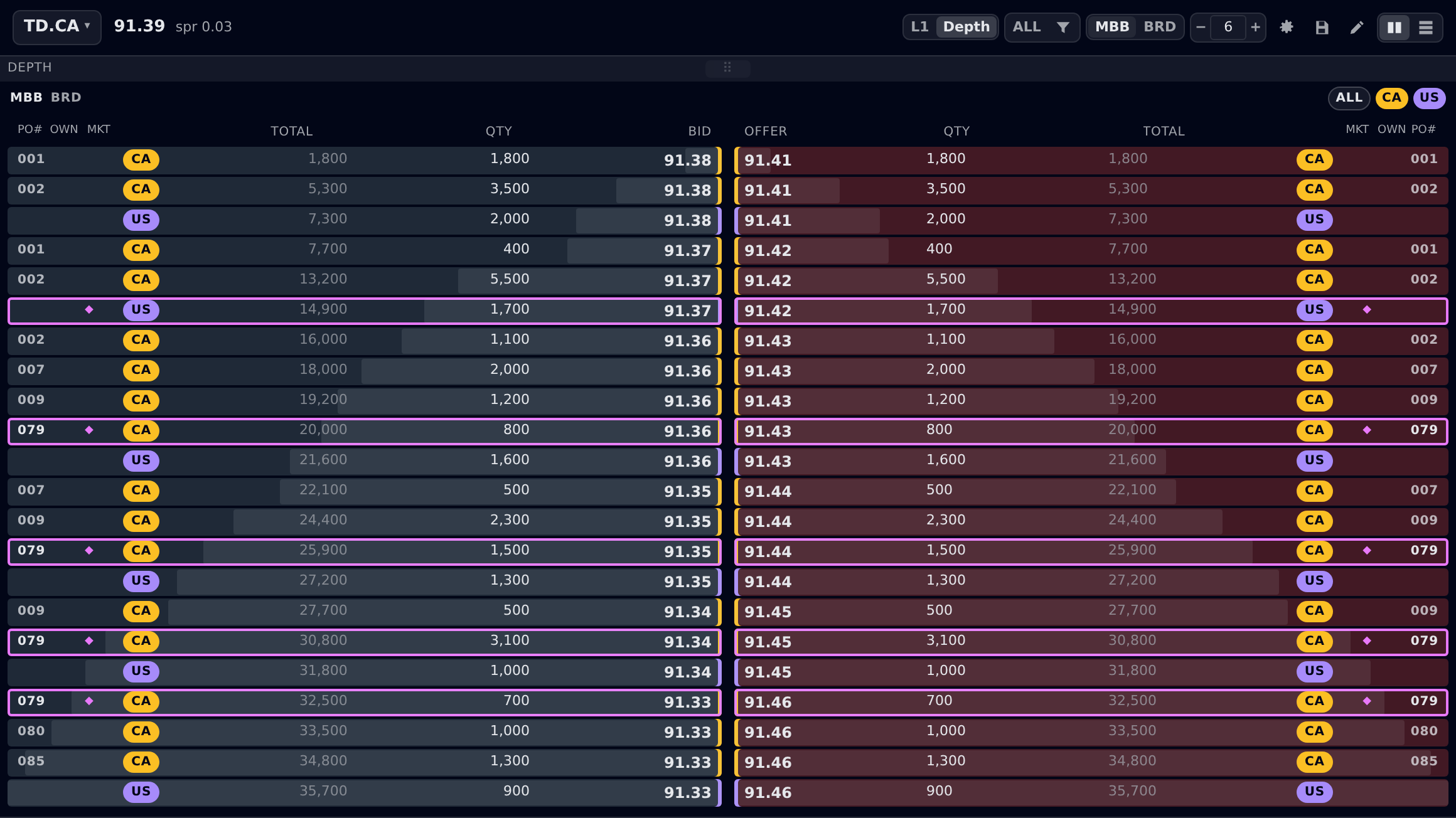
Market by broker
The PO# column appears, and each price splits by the broker behind it, with that broker's own orders folded into one line. Venues that publish no participant id leave the cell blank rather than filling it with a placeholder.
Market by order
One line per resting order. A broker with two orders at one price shows one line in MBB and two here. Which is the whole reason the desk asked. Row order is stable by market, then broker, then order id, never by size: the ladder is click-to-trade, and rows that re-sort as sizes tick move the line out from under the cursor between the look and the click.
Interlisted L1
Both listings, both currencies, columns aligned so the sibling's figures sit directly under the primary's. The panel subscribes to both, so it is live rather than a snapshot. And a listing that isn't quoting yet reads as an em dash, never as zero.

A view the trader asked for but cannot have is explained in one line, not silently swapped for another.
Design rule: unattributed feeds lock the buttons and say why
What shipped with it
The part that isn't the screenshotA prompt produced the feature. It also produced what a feature needs to survive contact with your release process: the tests that prove it, the translations, and a performance arm that measures the heaviest view rather than the cheapest one.
Views
4 × 4 × 3Granularity, book and market scope, in one ladder. Never one ladder per market.
Languages
Six localesEvery new string translated. Codes stay verbatim: MICs, PO#s, MBP, BRD. The names behind them don't.
Coverage
Unit & end-to-endThe folds, the refinement chain and row-order stability in unit specs; all three cycles walked in the real app.
Performance
≥ 30 fpsA harness arm drives market-by-order, the heaviest view, under a live feed, with the feature on rather than measuring the old ladder by mistake.
Bring your own version of Qanvas to life
Same process, your instrumentYour book has its own version of this request: the one you’ve said out loud on a desk call because writing it into a ticket never quite captured it.
Bring it to Qanvas the same way: in plain language, on your own instrument. See what comes back.
Talk to us about your book →